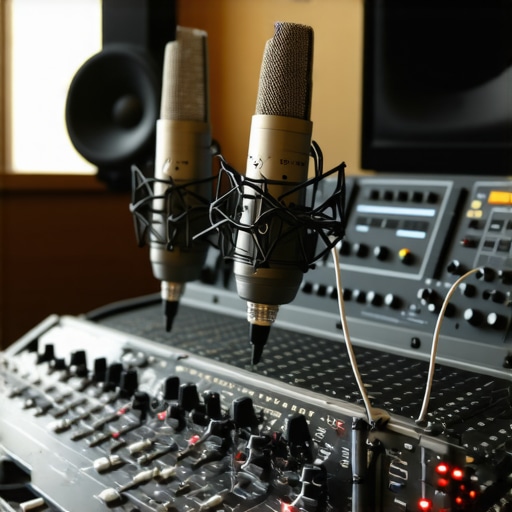
I remember the first time I tried recording my voice at home. I was so excited—until I listened back and heard a muddy, echoing mess that made me want to hide under my desk. That lightbulb moment hit me hard: I had no idea how crucial the right setup was. Over time, I learned that the difference between amateurish recordings and professional-quality audio often comes down to a few key choices in gear and environment. If you’ve ever faced similar frustrations, you’re not alone. The good news? There’s a straightforward path to transform your home studio into a professional-sounding space.
Why Getting Your Voiceover & Audio Interface Setup Right Matters
Many newcomers underestimate how much your setup influences your final sound. A subpar microphone, an unsuitable interface, or poor room acoustics can sabotage your best efforts. According to a study by the Audio Engineering Society, even minor improvements in your signal chain can significantly enhance audio clarity and listener engagement. That’s why investing time and effort into your setup pays off—your voice deserves to be heard loud and clear.
Have you ever recorded something that sounded decent but just didn’t hit the mark? Maybe your voice was muffled, or you kept fighting background noise? If so, you’re probably making one or more common mistakes that I’ve been guilty of myself—like ignoring the importance of proper gain staging or neglecting room treatment. Trust me, I’ve been there. Early on, I thought I could just plug in and go, but I quickly realized that the magic lies in the details.
Today, I promise to guide you through the essential steps to set up your voiceover and audio interface for professional results. From choosing the right gear to optimizing your environment, I’ll share practical tips that have worked for me and countless others. Whether you’re aiming to record podcasts, voiceovers, or music, this guide will help you avoid costly mistakes and get your sound studio-ready.
Thinking, “Is this really worth the effort?” I get it. It’s tempting to just press record and hope for the best. But trust me, a little planning and the right tools make all the difference. And if you’re unsure about what gear to pick, I’ve included some detailed recommendations, like how to choose studio headphones that deliver crystal-clear sound. For now, let’s dive into what really makes a difference in your setup—so you can start sounding like a pro, today.
Choose the Right Microphone to Capture Your Voice
Start by selecting a condenser microphone, which is ideal for capturing vocal nuances. I once used a cheap dynamic mic early in my journey, and the results were muddy. Upgrading to a decent condenser mic like the Audio-Technica AT2035 dramatically improved clarity. When shopping, look for microphones with a cardioid pattern to focus on your voice and minimize room noise. Learn more about microphone selection here.
Set Up Your Audio Interface Correctly
Your audio interface acts as the bridge between your mic and computer. I recommend connecting your mic to the interface with XLR cables, then adjusting the gain knob. A common mistake is setting gain too high, causing distortion. A good rule: aim for a level where your loudest recordings peak around -6 dB. For detailed setup tips, check this guide to audio interface setup. I once left the gain too low, resulting in weak recordings, but after calibration, everything sounded crisp and professional.
Optimize Your Room Acoustics for Clear Recordings
Room sound is often overlooked but crucial. I once recorded in a bare room, and the echo ruined my audio. Adding foam panels, bass traps, and even moving furniture helped absorb sound reflections. Think of your room as a musical instrument—if it’s too reflective, your voice will echo. Use a simple setup like a makeshift booth or even hanging blankets to improve sound quality. For more on room treatment, visit this comprehensive guide.
Get Your Headphones Right for Accurate Monitoring
Quality studio headphones are essential to hear your recordings accurately. I initially used consumer earbuds, which made editing a nightmare. I switched to open-back headphones like the Sennheiser HD 650, which revealed details I never heard before. For podcasting and voiceover work, choose headphones that offer flat frequency response for honest monitoring. For recommendations, see the studio headphones buying guide.
Regularly Calibrate and Test Your Setup
Once everything is assembled, do a test recording. I once recorded a script and noticed hissing sounds; it turned out my interface’s buffer size was too low. Adjust buffer settings in your DAW or interface software for smooth performance. Periodic checks ensure your setup remains optimal. Also, keep your drivers updated and run calibration tests to maintain consistency. This routine keeps your sound professional and reliable.
Many enthusiasts believe that simply plugging in a good microphone and hitting record is enough to produce professional-quality audio. However, this misconception can lead to costly mistakes that compromise your sound. Let’s dig deeper into the nuances most people overlook, and how to avoid falling into these traps.
Why Most Get the Microphone Placement Wrong
One of the most overlooked details is microphone placement. While beginners tend to place their mic too close or too far, the optimal distance depends on your voice and the mic type. Too close, and you risk plosive sounds and sibilance; too far, and your voice loses warmth and clarity. The sweet spot generally falls between 6 to 12 inches, but this varies. Experimenting with angle and distance ensures your voice is captured crisply without unwanted noise or distortion. Trust me, a slight adjustment in mic placement can dramatically improve your recordings.
Common Myth About Room Acoustics
A widespread myth is that any room with carpets and curtains will automatically sound good. In reality, many home studios suffer from standing waves and flutter echoes that muddle your sound. The key is understanding the room’s acoustic response and applying targeted treatments like bass traps and diffusers. Overusing foam panels in the wrong places can even make matters worse by creating uneven sound absorption. A nuanced approach—listening critically and testing with test tones—helps you identify the real issues. For detailed tips, check this guide to room treatment.
Beware of Gain Staging Mistakes
Many people set their gain too high, expecting louder recordings to sound better. This often causes clipping and distortion, especially if your interface or DAW’s input levels aren’t calibrated properly. Conversely, setting gain too low results in noisy, weak audio that’s hard to edit. The real trick is to set your gain so that your loudest speech peaks just below 0 dB, ideally around -6 dB for headroom. Regularly testing and calibrating your input levels prevents these common pitfalls, ensuring your audio remains clean and professional. For a step-by-step setup, visit this expert guide.
How Can Advanced Users Fine-Tune Their Setup?
Beyond basic setup, experienced voiceover artists often use spectral editing and EQ to refine their sound. They also employ high-quality studio headphones with flat frequency response for accurate monitoring. But even advanced users sometimes neglect proper calibration of their monitors or fail to account for room resonances. Remember, the key is consistency—regularly testing and calibrating your setup keeps your recordings on point. For top-quality headphones recommendations, see the studio headphones buying guide.
Have you ever fallen into this trap? Let me know in the comments and share your experience. Avoiding these nuanced mistakes can elevate your recordings from amateurish to professional, so take your time to refine your setup with care.
Keeping Your Gear in Top Shape for Consistent Quality
Investing in quality equipment is just the start; maintaining it properly ensures your voiceover setup continues to deliver professional results over time. Regular cleaning of your microphone and equipment prevents dust buildup that can degrade sound quality. Use a soft, lint-free cloth to wipe down your microphone capsule and connectors, avoiding harsh chemicals that might damage sensitive parts.
Pay attention to your cables and connections. Inspect XLR cables and USB ports regularly for signs of wear or corrosion. Replacing worn cables promptly prevents noise issues and signal loss. I personally check my cables monthly and replace any that show signs of damage to avoid frustrating playback issues during critical recordings.
How do I keep my setup running smoothly over time?
Calibration is key. Periodically test your audio interface and DAW settings to ensure levels stay consistent. Update your drivers and firmware from trusted sources to fix bugs and improve performance. Additionally, keeping your software, like your DAW and plugins, up to date guarantees compatibility with new features and security patches, which is vital for professional workflows.
Tools I Recommend for Longevity and Precision
For precise monitoring, I swear by the Sennheiser HD 650. These open-back headphones provide flat frequency response, revealing every detail in my recordings. They’re durable and comfortable, making long editing sessions less fatiguing. Pairing these with a quality audio interface like the Focusrite Scarlett ensures your recordings are clear and consistent.
For software, I recommend Reaper. It’s affordable, reliable, and highly customizable. Regularly backing up your projects and settings prevents data loss and saves you time during troubleshooting. Additionally, consider investing in a dedicated backup system or cloud storage to safeguard your work long-term.
Future Trends in Voiceover Equipment Maintenance
As technology evolves, smart monitoring tools integrated with AI will likely become standard for maintaining optimal setup conditions. These tools will automatically detect issues like calibration drift or component degradation, alerting you before sound quality suffers. Staying informed about these innovations ensures your setup remains cutting-edge and reliable.
Start implementing routine checks and investing in durable, high-quality gear today. For example, set a monthly schedule to clean and calibrate your equipment, and regularly review software updates. These small steps will pay off by extending the lifespan of your gear and maintaining your professional sound quality.
If you want personalized advice on maintaining your setup or need help selecting the right tools, don’t hesitate to contact us. Remember, a well-maintained setup is the foundation of consistent, high-quality recordings that will serve your projects for years to come. Try one of these maintenance tips today and see the difference it makes in your workflow!
The Hardest Lesson I Learned About Setting Up a Voiceover Studio
One of the toughest lessons I encountered was realizing that investing in high-end gear isn’t enough; the environment plays an equally crucial role. I once thought a fancy microphone would solve all sound issues, only to discover that a poorly treated room turned my recordings into echoes and muddiness. It taught me that acoustic treatment and placement are just as vital as the equipment itself.
My Essential Toolkit for Achieving Professional Voice Recordings
Over the years, I’ve trusted tools like the Sennheiser HD 650 headphones for accurate monitoring, which reveal even subtle imperfections in my recordings. For my microphone, I prefer the Audio-Technica AT2035, known for its clarity and warmth. And my audio interface of choice is the Focusrite Scarlett, providing reliable, clean gain. These tools have become my backbone for consistent, professional-quality results.
Believe in Your Potential and Keep Improving
The biggest encouragement I can give is this: don’t let fear or uncertainty hold you back. Your voice deserves to be heard with clarity and confidence. Every adjustment, from mic placement to room treatment, is a step toward mastering your craft. Remember, even seasoned professionals constantly refine their setups. So, take action today—your future recordings will thank you.
What’s Your Next Step in Perfecting Your Voiceover Environment?
Have you ever struggled with finding the right microphone placement or room treatment? Share your experience below, and let’s help each other elevate our voiceover game!
http://Emily%20Carter
This post really hits home for me. When I first started recording, I underestimated how much environment and gear quality could affect the final sound. I remember my early recordings being muffled and echoey until I took the time to treat my room with some bass traps and decent acoustic panels. The difference was night and day! Honestly, I think many people overlook room acoustics, thinking a few curtains or carpets will do the trick. In my experience, testing with test tones and adjusting treatments carefully can find those ‘sweet spots’ for sound clarity. Has anyone experimented with DIY acoustic treatments? I’ve found that hanging thick blankets and positioning furniture strategically can give surprisingly good results without breaking the bank. It’s all about those small, deliberate adjustments to get a professional sound. I’d love to hear how others have tackled room issues on a budget.
http://Michael%20Davis
This is such a detailed and practical overview of setting up a voiceover station. I completely agree with the emphasis on room acoustics—early in my journey, I overlooked this aspect and kept battling echoes and background noise. When I finally started experimenting with DIY solutions like hanging blankets and setting up makeshift bass traps from foam panels, the clarity of my recordings took a big leap forward. It’s amazing how small tweaks can make a huge difference before investing hundreds in high-end gear. I’m curious, has anyone found a particular DIY approach that worked especially well for small or oddly shaped rooms? Also, I’ve noticed that consistent calibration and maintenance routines really extend the lifespan of my equipment and keep results steady. Maintaining a regular schedule for checking levels, updating drivers, and cleaning gear has saved me so many headaches. Do others have tips on balancing budget-friendly DIY treatments with high-quality gear to optimize sound? Looking forward to hearing your insights!
http://Samantha%20Lee
Reading through this guide really reinforced what I’ve learned from trial and error about the importance of microphone placement and room acoustics. When I first started recording, I didn’t pay much attention to where I placed my mic or how reflective my room was, and my audio sounded dull and muddled. It wasn’t until I experimented with different distances and added some DIY acoustic treatments, like hanging blankets and repositioning furniture, that everything improved. The part about regularly calibrating and checking your gear hit home—simple steps like updating drivers and doing test recordings helped me catch issues early. I’m curious—has anyone here found a particular DIY treatment or simple setup tweak that made a noticeable difference without costing a fortune? What’s your go-to tip for small-space environments? I believe that patience and small adjustments can really elevate the quality of recordings, even on a budget.